[元件] Pipe
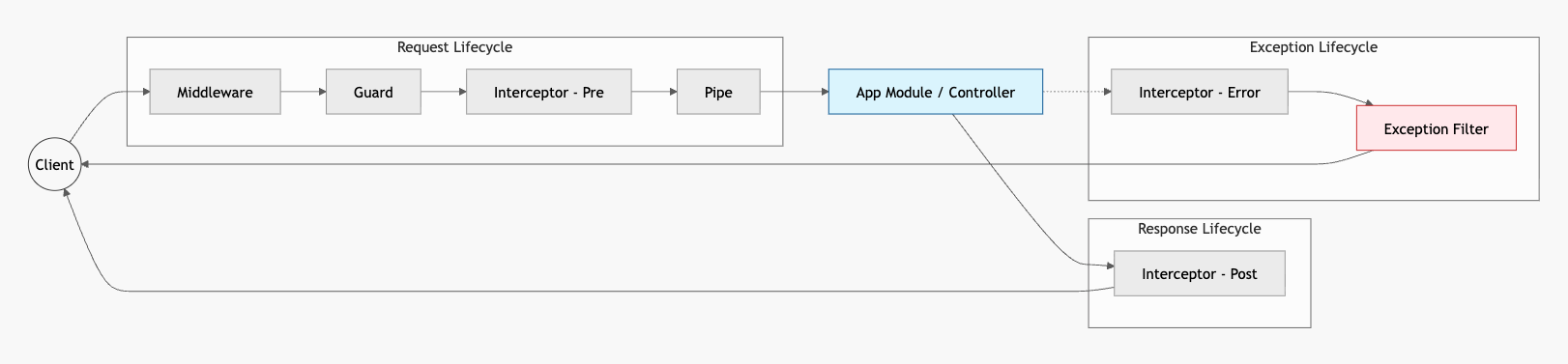
pipe 可以驗證輸入輸出的格式並進行轉型。
參數驗證
在 @Query 或 @Param 裝飾器中傳入參數名稱與 ParseIntPipe,就可以轉換參數型別:
@Get('test-parse-int-pipe')getTestParseIntPipe(@Query('id', ParseIntPipe) id: number) { return `id type: ${typeof id}`; // id type: number}ParseIntPipe 的建構函式可以傳入狀態碼,表示請求格式有誤時的回應:
@Get('test-parse-int-pipe')getTestParseIntPipe( @Query( 'id', new ParseIntPipe({ errorHttpStatusCode: HttpStatus.NOT_ACCEPTABLE, }), ) id: number,) { return `id type: ${typeof id}`;}預設的訊息會明確指出是在驗證階段發現的錯誤:
{ "message": "Validation failed (numeric string is expected)", "error": "Not Acceptable", "statusCode": 406}只要是能拋出錯誤的地方,就能自訂回應內容,透過 exceptionFactory 的 callback 拋出:
@Get('test-parse-int-pipe')getTestParseIntPipe( @Query( 'id', new ParseIntPipe({ exceptionFactory: (error) => new HttpException(error, 999), }), ) id: number,) { return `id type: ${typeof id}`;}多筆資料的參數,如 ?ids=1,2,3,要使用 ParseArrayPipe,並在建構函式中設定 items 和 seperator 來指定要解析的資料型態與分割符:
@Get()getTodos( @Query('ids', new ParseArrayPipe({ items: Number, seperator: ',' })) ids: number[],) { return { ids };}物件驗證
驗證物件資料需要使用 ValidationPipe,並安裝相關的套件:
npm i class-validator class-transformer透過物件形式傳輸的資料也稱作 DTO:
export class CreateTodoDto { public readonly title: string; public readonly content: string;}配合 class-validator 的裝飾器就可以附加每個欄位的驗證規則:
export class CreateTodoDto { @MaxLength(100) @MinLength(1) public readonly title: string;
@MaxLength(100) @IsOptional() public readonly content?: string;}官方強調雖然用 interface 定義格式也能達到驗證的效果,但是只是 TS 的檢查語法,不會被編譯成 class 或其他實例,因為 runtime 階段 interface 就不存在了,沒有辦法在傳輸的過程中被 class-validator 檢查。
部分套用
套用方式同 exception filter,使用 @UsePipe 套用在指定的方法或是整個 controller 上。
參數型別指定為 CreateTodoDto 這個類別,ValidationPipe 就會根據 CreateTodoDto 每個欄位的驗證規則來比對:
@UsePipes(ValidationPipe)@Post()createTodo(@Body() data: CreateTodoDto) { console.log(data);
return data;}故意傳入一個不符格式的 {},會得到:
{ "message": [ "title must be longer than or equal to 1 characters", "title must be shorter than or equal to 100 characters" ], "error": "Bad Request", "statusCode": 400}在 CreateTodoDto 中有對 content 掛上 @IsOptional(),因此這個沒給這個值或是給空值不會報錯。
如果將 @UsePipes 移除,DTO 中掛的所有規則都不會生效,這個 POST 請求就會直接通過,得到一個 {}。
全域套用
在根模組進行注入:
@Module({ controllers: [AppController], providers: [ { provide: APP_PIPE, useClass: ValidationPipe, }, ],})export class AppModule {}或是在啟動程序中呼叫 useGlobalPipes 並傳入實例:
async function bootstrap() { const app = await NestFactory.create(AppModule); // 建立實例 app.useGlobalPipes(new ValidationPipe()); await app.listen(process.env.PORT ?? 3000);}建構函式
在 @UsePipes 傳入 ValidationPipe 時,會自動建立實例,再根據參數型別套用驗證:
@UsePipes(ValidationPipe)手動建立實例時可以在建構函式中啟用一些設定,例如驗證失敗時不給任何 message:
@UsePipes( new ValidationPipe({ disableErrorMessages: true, }),)使用 whitelist: true 會過濾掉不在 DTO 裡的欄位,使用 forbidNonWhitelisted 會讓帶有多餘欄位的資料請求失敗:
@UsePipes( new ValidationPipe({ whitelist: true, forbidNonWhitelisted: true, }),)轉型
transform 設為 true 後,驗證結束時會將物件資料轉型,如下面範例,傳入的 data 通過驗證後,會依照我們給予的參數型別 data: CreateTodoDto,轉型成 CreateTodoDto 實例:
@UsePipes( new ValidationPipe({ transform: true, }),)@Post()createTodo(@Body() data: CreateTodoDto) { const isInstance = data instanceof CreateTodoDto;
return { msg: '這是被轉換的資料', isInstance, data, };}@Query 或 @Param 的參數也可以透過這種設定來轉型。
共用格式
DTO 可以透過繼承來映射出新的 DTO,首先要安裝:
npm i @nestjs/mapped-types部分套用
用 PartialType 繼承 ,全部欄位都會變成可選的,但驗證規則一樣保留:
export class UpdateUserDto extends PartialType(CreateTodoDto) {}選擇套用
在 PickType 中的陣列放入指定欄位名稱,就可以繼承該欄位:
export class UpdateTodoDto extends PickType(CreateTodoDto, ['title']) {}排除套用
和 PickType 相反,可以排除指定欄位:
export class UpdateTodoDto extends OmitType(CreateTodoDto, ['title']) {}合併套用
合併任意 DTO 的全部欄位:
export class UpdateTodoDto extends OmitType(CreateTodoDto, OtherDto) {}自訂 pipe
運行的流程也和 filter 類似,沒有通過條件判斷就 throw 中斷流程:
@Injectable()export class CustomParseIntPipe implements PipeTransform { transform(value: string, metadata: ArgumentMetadata) { const intValue = parseInt(value, 10);
if (isNaN(intValue)) { throw new NotAcceptableException('不是數字'); }
return intValue; }}在裝飾器中傳入使用:
@Get('test-parse-int-pipe-custom')getTestParseIntPipeCustom( @Query('id', CustomParseIntPipe) id: number,) { return `id type: ${typeof id}`;}小結
pipe 是 NestJS 必用的元件,基本上 ValidationPipe 就已經能做到基本的資料驗證。
class-validator 適用於以類別為主的資料模型,如果要和前端環境一起共用則推薦使用 Zod,有專用的套件 nestjs-zod 提供 pipe 元件。